

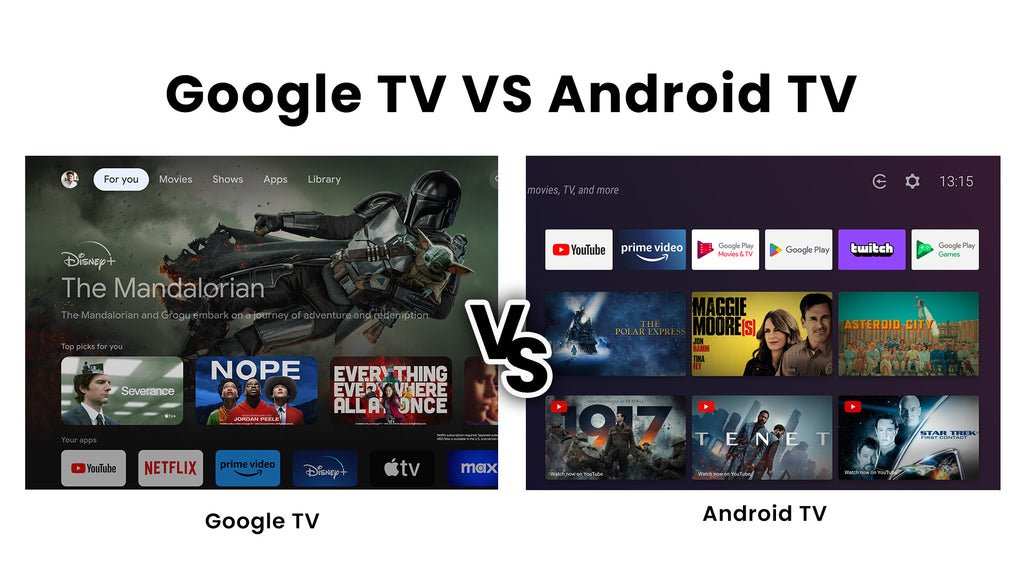
The difference between Android TV and Google TV lies mainly in their user interface and content navigation. **Android TV offers a more traditional layout, while Google TV emphasizes personalized content aggregation.** Knowing these distinctions helps you choose the platform that best fits your viewing habits.
Android TV remains familiar to longtime users, with easy access to apps and settings. Google TV, however, arranges content based on your preferences, making it easier to find what you want quickly. Understanding these differences simplifies your decision-making process.

Android TV vs Google TV Difference: A Complete Breakdown
When you start shopping for a smart TV or a streaming device, one of the most common questions people have is about the differences between Android TV and Google TV. Both platforms are popular choices because they offer a wide range of apps, easy-to-use interfaces, and seamless integration with other Google services. But what sets them apart? And which one is better suited for your needs? This guide will help answer those questions by exploring every detail of Android TV and Google TV. We’ll look at their features, user experience, device compatibility, content recommendations, and more.
Understanding Android TV and Google TV
Before diving into comparisons, it’s important to understand what each platform is.
- Android TV is actually the operating system that runs on many smart TVs and streaming devices. It is built by Google and designed to bring Android’s capabilities to your TV screen.
- Google TV, on the other hand, is a newer interface or user experience layer that runs on top of Android TV. The term “Google TV” has been used for a few years, but recently it has become more prominent as a branded platform.
In simple terms, Android TV is the underlying system, while Google TV is a type of user interface or experience that is built on top of Android TV.
Design and Interface
One of the most noticeable differences is how each platform appears and feels when you turn on your TV.
Android TV Interface
- Android TV offers a clean, straightforward home screen with horizontal rows that contain your favorite apps, live TV, and recommendations.
- The layout is simple, making it easy for users to find what they need quickly.
- The app icons are large and easy to navigate using your remote control.
Google TV Interface
- Google TV introduces a more organized and personalized home screen with a focus on content discovery.
- Instead of just app icons, it highlights shows and movies from various apps all in one place.
- The interface uses large images, posters, and cards to make browsing more engaging and visually appealing.
In essence, Google TV emphasizes content over apps, making it easier to find something to watch without jumping from app to app.
Content Discovery and Recommendations
Content recommendation is a key area where Google TV and Android TV differ significantly.
Android TV Recommendations
- Offers basic suggestions based on your viewing habits.
- Recommendations come mainly from the apps you have installed and your recent activity.
- The suggestions are useful but not as personalized or extensive as Google TV.
Google TV Recommendations
- Provides highly personalized content suggestions by analyzing your viewing history across multiple apps.
- Features a “For You” row that highlights movies and shows you are likely to enjoy.
- Integrates content from various streaming services to give a unified browsing experience.
This focused approach makes Google TV more appealing to users who want a smarter way to find new content without searching multiple apps.
Device Compatibility and Availability
The platforms differ not only in features but also in where and how you can use them.
Android TV Devices
- Many smart TVs from brands like Sony, Philips, and Sony include Android TV built-in.
- Standalone devices such as the NVIDIA Shield TV also run Android TV.
- Android TV is more flexible in terms of hardware options and price range.
Google TV Devices
- Google TV is primarily available on newer Google Chromecast devices, such as Chromecast with Google TV.
- Some smart TVs are launching with Google TV pre-installed, especially models from TCL and Hisense.
- While Google TV is relatively newer, it is designed to eventually replace the Android TV branding on devices.
If you want a device with Google TV, look for recent models. Android TV broadens your choices across various hardware.
Apps and Content Support
Both platforms support most popular streaming apps, but there are slight differences.
- Google Play Store is available on both Android TV and Google TV, offering access to thousands of apps, games, and streaming services.
- Apps like Netflix, Hulu, Amazon Prime Video, Disney+, and YouTube are compatible with both platforms.
- Google TV’s interface arranges apps differently, with more emphasis on curated content rather than app icons.
- Google TV generally receives app updates and new features faster, given its newer interface and integration capabilities.
Choosing between the two generally won’t limit your access to popular apps but can influence how you interact with them.
Voice Control and Integration
Google’s voice assistant, Google Assistant, plays a pivotal role in both platforms.
Android TV Voice Features
- You can control your TV with voice commands, search for content, and control smart home devices.
- Supported through the remote control’s built-in microphone or via connected devices.
- Voice search is integrated directly within the interface and apps.
Google TV Voice Features
- Offers similar voice control capabilities but with enhanced integration and faster responses.
- Allows you to ask questions, get recommendations, and control smart home devices more seamlessly.
- Google TV also supports watching content and controlling playback entirely through voice commands.
Overall, both platforms enable hands-free control, but Google TV’s newer interface is optimized for more natural and integrated voice experiences.
Updates and Future Prospects
Just like any technology, platforms evolve over time. Google has announced that Google TV will be the focus moving forward, with updates rolling out to devices supporting it.
- Android TV will continue to operate, but new features and design improvements are more likely to appear on Google TV devices.
- Google plans to unify their TV platform under the Google TV branding, making the experience more consistent across devices.
- Upcoming updates are expected to enhance personalization, content discovery, and smart home integration.
For consumers choosing a new device, selecting a Google TV-compatible model might offer a more future-proof experience.
Cost Considerations
Price can also influence your choice between Android TV and Google TV devices.
- Android TV devices are available at various price points, from budget options to premium models.
- Google TV devices like Chromecast are often priced competitively, making it an affordable way to access the latest interface.
- Smart TVs with Android TV or Google TV built-in vary in price based on features, size, and brand.
Knowing your budget and what features matter most will help determine which platform offers the best value.
Summary of Key Differences
Here’s a quick comparison to help clarify the main points:
| Aspect | Android TV | Google TV |
|---|---|---|
| Design | Simple, app-focused interface | Content-centered, visually rich interface |
| Content Recommendations | Basic, app-based suggestions | Personalized, cross-application suggestions |
| Device Compatibility | Broad, includes many smart TVs and streaming devices | Limited, mostly new Chromecast and select smart TVs |
| App Support | Wide range of apps via Google Play Store | Same app support, with enhanced interface |
| Voice Control | Supported, through Google Assistant | Supported, with improved integration and speed |
Understanding these differences can help you pick the right platform for your viewing habits and preferences.
Choosing between Android TV and Google TV comes down to what you prioritize most in your TV experience. If you like a straightforward, app-focused setup, Android TV might be the better choice. But if you prefer a more personalized, visually appealing content discovery experience, Google TV offers significant advantages. Both platforms work well with popular streaming services and voice commands, ensuring a smooth and enjoyable viewing experience. As Google continues refining its offerings, Google TV is set to become the standard for future smart TV interfaces. Whichever you choose, understanding these differences will make your purchase smarter and your entertainment more satisfying.
Frequently Asked Questions
What are the main user interface differences between Android TV and Google TV?
Android TV features a traditional app-centric interface with a focus on browsing apps and settings. Google TV, on the other hand, offers a personalized home screen that highlights content recommendations based on viewing habits. The layout in Google TV integrates content from multiple streaming services more seamlessly, making it easier to find suitable shows and movies without switching between apps.
How do content recommendations vary between Android TV and Google TV?
Google TV uses a sophisticated algorithm to analyze your viewing preferences, providing tailored content suggestions on the home screen. Android TV also offers recommendations, but they are generally less personalized and rely more on the apps’ individual algorithms. Google TV’s approach helps users discover new content across platforms without deep searching.
In what ways do the available apps differ between Android TV and Google TV devices?
Android TV provides access to a wide range of apps through the Google Play Store, similar to smartphones. Google TV devices, however, often come with pre-installed apps optimized for the platform, and the user interface prioritizes streaming services. While both support major apps like Netflix and YouTube, Google TV emphasizes a unified search experience across multiple apps.
Does the operating system update process differ between Android TV and Google TV?
Android TV devices typically receive updates directly from the manufacturer or Google, depending on the device. Google TV, being a newer platform based on Android, receives updates through Google’s rollout schedule, which may be more centralized. The update process tends to be streamlined for Google TV, ensuring users get the latest features and security patches promptly.
Are there differences in device compatibility and hardware options between Android TV and Google TV?
Android TV runs on a broader range of devices, including smart TVs, streaming boxes, and set-top boxes from various manufacturers. Google TV, initially available on select devices like Chromecast with Google TV, is gradually expanding to other hardware. Hardware options for Google TV tend to focus on integration with the platform’s personalized features and content discovery capabilities.
Final Thoughts
Android TV offers a customizable interface with access to a wide range of apps through the Google Play Store. Google TV, on the other hand, provides a more organized content platform with personalized recommendations. The key difference lies in their user experience and content management, making each suitable for different preferences. Understanding these distinctions helps you choose the right TV platform for your entertainment needs. Overall, the Android TV vs Google TV difference shapes how users interact with their devices, affecting ease of use and content discovery.
