

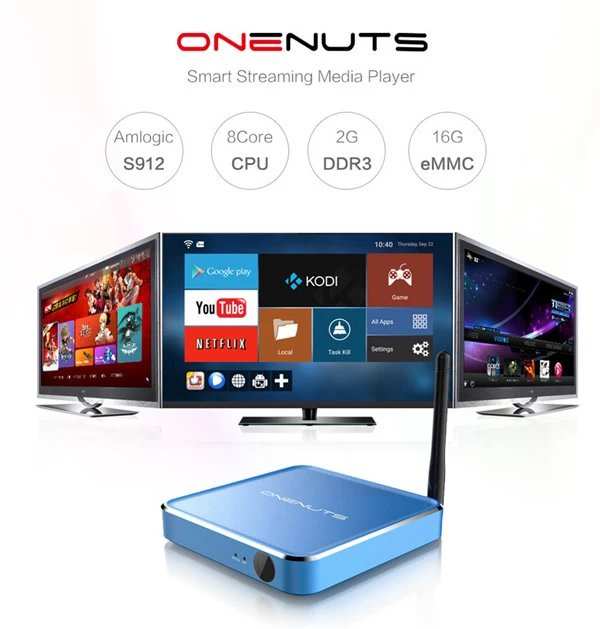
The advantages of Android TV include seamless app access, personalized content, and easy integration with other devices. **Android TV offers a versatile interface that makes browsing and selecting entertainment effortless.** It allows users to enjoy popular streaming services, games, and smart home controls all in one place. Knowing what are the advantages of Android TV helps you choose a device that simplifies your entertainment experience and fits your lifestyle. Its adaptability and user-friendly features make it a smart choice for changing viewing habits.

What Are the Advantages of Android TV
Android TV brings a new level of experience to your television, making it more than just a screen for watching shows and movies. It combines the power of Google’s smart technology with an easy-to-use interface, giving users access to a vast array of content, apps, and features. If you’re considering upgrading your television or simply want to know what benefits Android TV offers, you’re in the right place. Let’s explore all the advantages that make Android TV a popular choice among viewers worldwide.
Easy Access to a Wide Range of Content
One of the biggest benefits of Android TV is its ability to provide users with instant access to a diverse array of entertainment options. Unlike traditional TVs that rely mainly on cable or satellite channels, Android TV connects you to the internet, opening a world of streaming services and apps.
- Streaming Platforms: You can easily watch Netflix, Hulu, Amazon Prime Video, Disney+, and many others directly from your Android TV interface. These platforms offer an extensive library of movies, TV shows, documentaries, and original content.
- Live TV and Sports: Many Android TVs support live TV apps or integration with cable services, allowing you to watch news, sports, and live events right on your screen.
- Vast App Library: The Google Play Store is accessible directly from Android TV, offering thousands of apps, games, and utilities to enhance your viewing experience.
This extensive content library means you’ll never run out of options, whether you love binge-watching series, exploring documentaries, or playing games.
Seamless User Interface and Ease of Use
Android TV is designed with simplicity in mind. Its user interface makes navigation straightforward, even for newcomers to smart televisions. The home screen displays your favorite apps, recommended content, and quick access to settings, so you get the information you want without hassle.
- Personalized Recommendations: Android TV learns your viewing habits over time and suggests content you are likely to enjoy, saving you time searching for something to watch.
- Voice Search and Control: With built-in Google Assistant support, you can control your TV using simple voice commands. Just ask to find a movie, change channels, or control smart home devices without lifting a finger.
- Intuitive Navigation: The remote controls are designed to be user-friendly, with dedicated buttons for popular streaming services, voice commands, and quick settings.
This simplicity makes using Android TV comfortable for all ages, especially for families or those who prefer minimal technical effort.
Integration with Google Ecosystem
Android TV works seamlessly with other Google products, creating a connected smart home environment. If you already use Google services, you’ll find Android TV complements your existing setup perfectly.
Compatibility with Google Assistant
The voice-controlled Google Assistant allows you to perform multiple tasks with simple commands:
- Ask for weather updates, news headlines, or traffic information.
- Control compatible smart home devices like lights, thermostats, or security cameras.
- Get information from the web, such as sports scores, restaurant recommendations, or jokes to entertain your family.
Synchronization with Other Devices
Your Android TV can sync with your smartphone, tablet, or Google Nest devices. For example, you can cast videos or music directly from your phone to the TV, or use your mobile device as a remote control.
Access to a Wide Range of Applications and Games
Beyond streaming content, Android TV offers an extensive library of apps and games that extend the entertainment horizon.
- Utility Apps: Use apps like YouTube, Spotify, Google Photos, and weather apps for added convenience and entertainment.
- Gaming: Android TV supports a large selection of games, from casual puzzles to more immersive titles. Some games even support game controllers, making your TV a gaming console.
- Education and Learning: Kids and adults can explore educational content, language learning apps, and interactive stories directly on the TV.
Having a broad choice of applications makes Android TV a versatile device suitable for the entire family.
Multiple Connectivity Options for Better Experience
Android TV is built with a variety of ports and wireless options to enhance your multimedia setup:
- HDMI and USB Ports: Connect soundbars, gaming consoles, or external storage devices effortlessly.
- Wi-Fi and Ethernet: Smooth streaming without interruptions, whether through wireless or wired internet connections.
- Bluetooth: Pair Bluetooth headphones, speakers, or game controllers to expand your entertainment options.
This flexibility allows your Android TV to integrate well with your existing devices and setup.
Regular Software Updates and Long-Term Support
Google actively develops Android TV, providing regular updates that improve performance, add new features, and enhance security.
- Access to the latest apps and features without needing a new device.
- Security patches to keep your data safe.
- Compatibility improvements with new devices and services.
Reliable support ensures your TV remains up-to-date and secure over many years.
Cost-Effectiveness and Value for Money
Android TVs offer many features typically found in high-end models at competitive prices, making them a suitable value for consumers.
- Affordable options with premium features.
- Wide range of sizes and specifications to fit your budget.
- Additional features like voice control and smart home integration come at no extra cost or minor upgrades.
This affordability makes Android TV accessible to many households, providing advanced features without breaking the bank.
Enhanced Screen Mirroring and Casting Capabilities
Casting content from your mobile device or computer onto your Android TV is effortless with built-in Chromecast support.
- Share photos, videos, or presentations from your phone or tablet directly onto the big screen.
- Play games or view web pages on the larger display for a more engaging experience.
- Control your casting with your device as a remote, offering convenience and flexibility.
This feature makes Android TV ideal for family gatherings, presentations, or simply sharing moments with loved ones.
Smart Home Compatibility for a Connected Lifestyle
Android TV isn’t just about entertainment; it plays a role in managing your smart home devices.
- Control compatible smart lighting, thermostats, and security systems through your TV interface.
- Create scenes and routines that automate daily tasks, such as turning off lights when you start a movie.
- Receive notifications about your home’s status directly on your TV screen.
Integrating your smart home with Android TV simplifies daily routines and adds convenience.
Environmental Benefits and Energy Efficiency
Modern Android TVs are designed to be energy-efficient, helping you save on power consumption.
- Features automatic brightness adjustment based on ambient light.
- Energy-saving modes that reduce power when the TV isn’t actively used.
- LED screens that consume less energy compared to older display technologies.
Choosing an Android TV can contribute to reducing your carbon footprint without compromising on entertainment.
Customizable Interface and Personalization Options
Android TV offers a personalized experience tailored to your preferences.
- Arrange your apps and shortcuts for quick access.
- Choose themes, wallpapers, and display settings to match your style.
- Set parental controls to keep kids safe while browsing or watching content.
Personalization makes your TV truly your own and easy for every family member to use comfortably.
Android TV presents numerous advantages that make it a smart choice for anyone seeking more from their television. From vast content access and easy navigation to smart home compatibility and ongoing support, it covers all the essentials for a complete entertainment setup. Its affordability, customization options, and seamless integration across devices make Android TV stand out in the crowded TV market. Whether you want to enjoy streaming your favorite shows, play games, or control your smart house, Android TV offers the features to meet your needs in a simple and reliable way.
Frequently Asked Questions
How does Android TV enhance user interaction compared to traditional TVs?
Android TV offers an intuitive interface that simplifies navigation and access to content. Its user-friendly menus and customizable home screens make it easy to find movies, shows, and apps quickly. Additionally, voice control features allow users to operate the TV hands-free, making the overall experience more engaging and convenient.
What types of applications are available on Android TV that benefit viewers?
Android TV provides access to a vast selection of applications, including popular streaming services, games, and lifestyle apps. This variety allows users to personalize their entertainment options, whether they want to watch movies, listen to music, or play games, all from a single device.
In what ways does Android TV support connectivity with other devices?
Android TV integrates seamlessly with smartphones, tablets, and smart home devices. Features like casting enable users to display content directly from their mobile devices onto the TV screen. This compatibility simplifies the process of sharing media and controlling connected devices within a smart home setup.
How does regular software updates on Android TV improve the viewing experience?
Frequent updates ensure Android TV stays compatible with the latest apps and security standards. These updates often introduce new features, improve performance, and fix bugs, helping users enjoy a smoother and more reliable entertainment experience over time.
What options are available for customizing the Android TV interface to fit personal preferences?
Android TV allows users to personalize their interface through customizable widgets, app layouts, and themes. They can organize their favorite apps and content in a way that best suits their usage habits, making the device more tailored to individual preferences.
Final Thoughts
Android TV offers a user-friendly interface and access to a vast selection of apps via the Google Play Store. Its integration with Google Assistant allows for easy voice control and smarter search options. The customizable home screen keeps favorite content and apps within reach, making navigation effortless.
Additionally, Android TV supports casting from smartphones and tablets, making multimedia sharing simple. Regular updates improve functionality and security, ensuring a seamless experience.
What are the advantages of android tv include its versatility, extensive app library, and simple control features. These benefits make it an appealing choice for anyone seeking a smart and adaptable entertainment system.
