

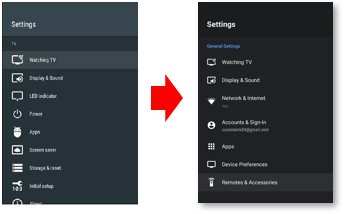
Updating your Android TV is generally safe and can improve performance and features. If you’re wondering, **is it safe to update Android TV**, rest assured that manufacturers design updates to enhance your device’s security and functionality. However, it’s wise to ensure your device has a stable internet connection and sufficient storage before proceeding. While updates may occasionally cause minor glitches, staying current helps protect your device from vulnerabilities. Making informed decisions about updates ensures your Android TV remains secure and running smoothly.

Is It Safe to Update Android TV?
Updating your Android TV might seem like a simple task, but many users worry about whether it’s safe or if it could cause problems. The truth is, knowing when and how to update your Android TV helps keep it running smoothly and securely. In this section, we’ll go over why updates matter, what risks they might carry, and how to ensure your device stays protected.
Why Are Android TV Updates Important?
Updates are more than just adding new features; they also offer critical security patches and bug fixes that keep your device running well. When manufacturers release updates, they fix known issues that could impact your TV’s performance or put your data at risk.
Some key reasons to keep your Android TV updated include:
- Enhanced Security: Updates close vulnerabilities that hackers could exploit.
- Improved Performance: Updates often make your TV faster and more responsive.
- New Features: Get access to the latest tools and entertainment options.
- Bug Fixes: Fixes for software glitches that could cause crashes or freezes.
Staying current ensures your TV remains safe, efficient, and full of the latest capabilities.
Potential Risks of Updating Android TV
While updates are usually safe, some users worry about possible issues. Here’s what you should know about potential risks:
Compatibility Problems
Sometimes, a new update might not work well with certain apps or accessories. For instance, if your device’s hardware is older, it might struggle to run the latest software smoothly.
Update Failures
In rare cases, updates can fail to install properly, leading to a non-responsive device or the “bricked” TV. This can happen if the internet connection drops during the process or if there’s a power outage.
Loss of Data or Settings
Although updates typically preserve your settings, some major upgrades might reset your preferences or erase saved data, requiring you to set everything up again.
Security Concerns During Update
Downloading updates from unofficial sources or insecure networks opens the door to malware or malicious files. Always ensure you’re updating your device from trusted sources.
How to Safely Update Your Android TV
Taking precautions makes updating safer and reduces the chance of encountering problems. Here are some best practices:
Check for Official Updates
Always update your Android TV through the device’s official settings menu. Here’s how:
- Navigate to the Settings menu on your TV.
- Select Device Preferences or About.
- Choose System update or similar.
- Follow the prompts to check for updates.
Create a Backup Before Updating
Although most updates don’t reset your data, it’s wise to back up your settings, apps, and preferences just in case. Use cloud services or external storage if possible.
Ensure a Stable Internet Connection
A reliable Wi-Fi connection prevents interruptions during the update process. Avoid updating when your internet is slow or unstable.
Update During a Time When Power Is Stable
Make sure your TV is plugged into a power source. Avoid updating during storms or power outages to prevent damage.
Stay Informed About the Update
Read release notes or announcements from your device manufacturer. This can help you understand what changes to expect and whether any special steps are needed.
What to Do If Something Goes Wrong
Even with precautions, sometimes issues happen. Here’s how to troubleshoot problems after an update:
Restart Your Device
Many issues resolve with a simple restart. Turn off your TV, unplug it, wait a few seconds, and turn it back on.
Perform a Factory Reset
If problems persist, you might need to reset your TV to factory settings. Be aware that this erases all data, so back up first.
Contact Customer Support
If you can’t resolve the issue, reach out to your device’s customer support team. They can provide guidance tailored to your model.
Additional Tips for Keeping Your Android TV Safe
Keeping your Android TV secure involves more than just updates. Consider these tips:
- Download Apps from Trusted Sources: Use the Google Play Store or official app marketplaces.
- Use Strong Passwords: Protect your accounts linked to your TV.
- Enable Automatic Updates: This ensures your device gets the latest security patches without manual effort.
- Keep Software and Apps Updated: Regularly update installed apps to patch security vulnerabilities.
- Be Wary of Public Networks: Avoid streaming or updating your device over unsecured Wi-Fi networks.
Summary
Deciding whether it’s safe to update your Android TV depends on a few factors. In most cases, updates are beneficial and help your device stay secure and functional. By following best practices—like updating from official sources, ensuring stable internet, and backing up data—you can enjoy the benefits of the latest software without risking your device’s health.
Keeping your Android TV current with the latest updates is a smart choice for security, performance, and new features. Just remember to stay vigilant about where and how you update, so your viewing experience remains smooth and trouble-free.
Frequently Asked Questions
What are the common risks involved when updating Android TV software?
Updating Android TV can occasionally lead to issues such as installation errors or compatibility problems with certain apps. In rare cases, a failed update might cause the device to become unresponsive or require a factory reset. However, these risks are minimal if you follow proper update procedures and use official software sources.
How can I ensure my Android TV update doesn’t disrupt my settings and data?
Before initiating an update, back up your device settings and important data. Most Android TV models allow you to save app configurations and preferences. Keeping your device connected to a stable Wi-Fi network and ensuring sufficient power reduces the chances of update interruptions that could affect your stored data.
What steps should I take to prevent potential update failures on Android TV?
Ensure your device is connected to a reliable internet connection and has enough storage space for the update. Avoid updating during periods of unstable network connectivity. Additionally, keep your device charged or plugged in during the process to prevent power loss, which can cause update failures.
Is it advisable to perform updates if my Android TV is experiencing performance issues?
Updating your Android TV can resolve many performance-related problems such as lag, app crashes, or connectivity issues. Manufacturers often include bug fixes and improvements in updates. However, if the device is severely damaged or outdated, consider consulting support before proceeding with the update.
Can I revert to an older version of Android TV if I encounter problems after updating?
Reverting to a previous version is generally complex and not recommended unless you have technical expertise. It may involve unlocking the device, which can void warranties or cause security concerns. Most users should contact manufacturer support if they experience issues post-update, rather than attempting a downgrade themselves.
Final Thoughts
Updating Android TV is generally safe if you follow proper procedures. Always back up your settings before updating to prevent data loss. Manufacturers regularly release updates to improve security and fix bugs.
Choosing the right time to update reduces potential issues. Make sure your internet connection is stable during the process. Trust the official updates from your device’s manufacturer to ensure safety.
is it safe to update android tv? Yes, as long as you follow recommended steps and use official sources. Keeping your device current enhances performance and security, making updates a beneficial practice.
