

To make sound louder on Android, you simply need to increase the volume and tweak a few settings. **Adjust the volume sliders and enable any available sound enhancements.** If you want even more power, you can use third-party apps or access hidden settings.
Changing sound levels is straightforward, and many devices offer built-in options to boost audio. Keep reading for quick tips to ensure your Android device delivers louder, clearer sound whenever you need it.

How to Make Sound Louder on Android
Many Android users find themselves wanting to boost the volume of their devices. Whether you’re trying to enjoy music more fully, make sure your notifications aren’t missed, or hear calls clearly in noisy environments, increasing your Android’s sound is often a top priority. Luckily, there are several ways to make your Android device’s sound louder. In this guide, you’ll learn practical and safe methods to enhance your device’s audio output, from simple in-built options to advanced tweaks.
Understanding Your Android’s Sound Settings
Before diving into boosting sound, it’s essential to understand how your device handles audio. Android devices come with a series of settings and features that control volume levels, audio effects, and more. Knowing these helps you optimize your volume in a way that’s safe for your device and your ears.
- Volume controls: Most Android phones have separate volume controls for media, calls, notifications, and alarms. Make sure you adjust all relevant sliders to the maximum, but also check if any are muted or set too low.
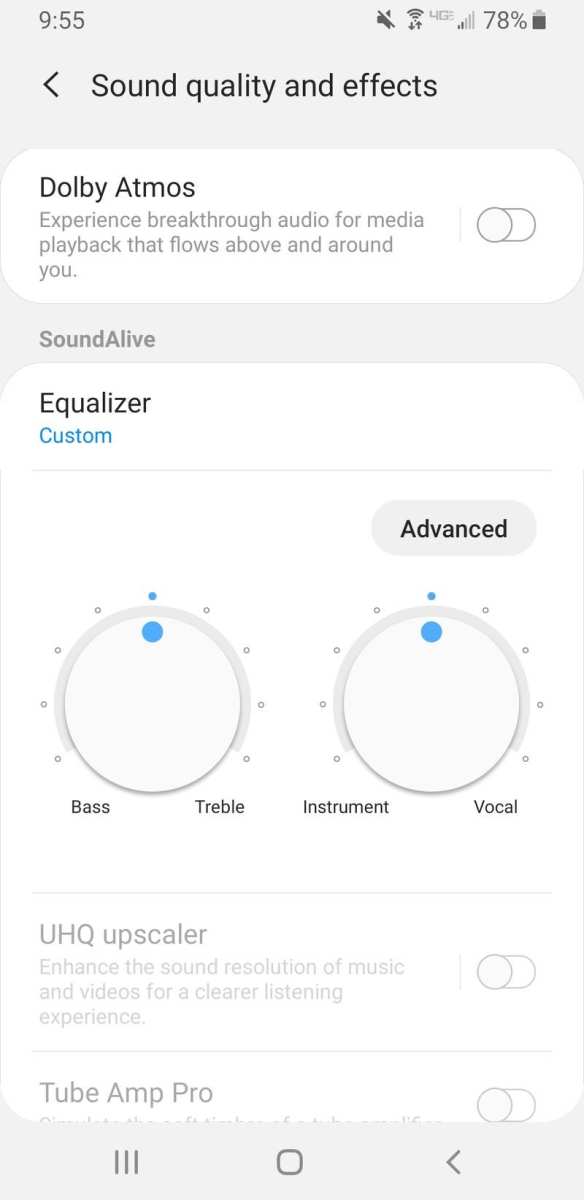
- Sound enhancements: Many Android devices come with built-in sound enhancement features, such as Dolby Atmos or similar technologies, which improve audio clarity and loudness.
- Accessibility options: Some Android phones include accessibility features that boost sound for people with hearing impairments, which can also increase overall sound levels.
Using Volume Settings for Maximum Sound
Start with the simplest method: adjusting your device’s volume settings to their maximum levels.
Adjust Media and Ringtone Volumes
On most Android devices, you can increase the volume by pressing the physical volume buttons on your side. When you press these buttons, a volume slider appears. Make sure to toggle all sliders to the highest setting. If you see separate sliders for media, ringtone, notifications, and alarms, ensure each one reaches its maximum.
Access Through Settings Menu
For more precise control:
- Open the Settings app.
- Navigate to Sound & Vibration or Sound.
- Adjust the media, notification, and alarm volumes to the maximum.
- Some devices allow you to enable “Media volume limit” or similar features—disable these for louder sound.
Enabling Sound Enhancements on Your Android
Many Android phones offer built-in sound enhancement features that can significantly boost auditory output.
Activating Dolby Atmos or Similar Features
If your device supports Dolby Atmos or similar sound enhancements:
- Go to Settings > Sound & Vibration.
- Look for options like Dolby Atmos, DTS:X, or other surround sound features.
- Enable these features and customize their settings if available.
Sound enhancements add depth and volume, making your audio feel louder and more immersive without damaging your hearing.
Using Equalizer Settings
Equalizers allow you to adjust the balance of bass, treble, and midrange sound frequencies. Increasing bass and treble can make audio sound louder and clearer.
- Open your Music app or audio player.
- Access the app’s equalizer settings—often found in the sound or playback settings.
- Increase the bass and treble sliders carefully, avoiding distortion.
- Some devices come with preset modes like “Boost” or “Loudness,” which can be activated for enhanced sound.
Auto-Volume and Volume Stabilization
Some Android devices include features designed to prevent sudden loud volume shifts, but these can also limit overall loudness.
Disable Auto-Volume Adjustments
If auto volume features are enabled, they might restrict your maximum volume:
- Go to Settings > Sound & Vibration.
- Find options like “Auto-Volume” or “Volume Stabilization.”
- Turn these off to allow maximum volume control.
Using Third-Party Apps to Increase Volume
If the built-in options aren’t enough, numerous apps on the Google Play Store can help you boost your device’s sound beyond the default limits.
Popular Volume Booster Apps
Choose apps with good reviews and a high number of downloads:
- Volume Booster GOODEV
- Super Volume Booster
- Precise Volume Control
- Sound Amplifier
How to Use These Apps Safely
When using volume booster apps:
- Download from trusted sources like Google Play Store.
- Start with small increases in volume to prevent damage to your speakers or ears.
- Avoid apps that claim to dramatically increase volume beyond safe levels—they might harm your hardware over time.
Adjusting Hardware and External Accessories for Louder Sound
Enhancing sound quality isn’t only about software—external accessories can also make your audio louder and clearer.
Using External Speakers or Headphones
External speakers often produce louder sound compared to built-in speakers. Consider:
- Connecting your phone to portable Bluetooth speakers.
- Using high-quality wired headphones with amplified drivers.
Adding External Amplifiers or Boosters
For extreme volume needs, portable audio amplifiers or headphone amplifiers can significantly increase loudness. These devices connect via Bluetooth or wired connections and boost your audio output without strain on your device.
Ensuring Safe Listening at Higher Volumes
While increasing volume, always keep your health and device longevity in mind:
- Limit your listening time at high volume to avoid hearing damage.
- Use noise-canceling headphones to enjoy louder sound without increasing volume excessively.
- Regularly check your device for overheating or distortions, which can signal too much volume being used.
Precautions to Consider When Making Your Android Sound Louder
Boosting your device’s volume can sometimes lead to issues, so always proceed with caution:
- Too much volume can damage your headphones or speakers over time.
- Listening at high volumes for extended periods can cause hearing problems.
- Some apps claiming to increase volume beyond hardware limits can cause distortions or hardware damage.
Summary of Key Tips to Make Your Android Sound Louder
– Adjust all volume sliders to maximum for media, calls, notifications, and alarms.
– Enable built-in sound enhancement features like Dolby Atmos and equalizers.
– Turn off auto-volume features that limit maximum loudness.
– Use trusted third-party apps cautiously for additional volume boost.
– Employ external speakers or amplifiers for more powerful sound.
– Always prioritize your hearing safety when increasing volume levels.
By combining these methods, you can get your Android device’s sound louder and more enjoyable without risking damage. Remember to listen responsibly and avoid turning the volume up too high for prolonged periods.
Frequently Asked Questions
How can I improve the overall volume on my Android device?
To increase the overall volume, press the volume up button on your device. Additionally, go to Settings > Sound & Vibration and adjust the media, ringtone, and notification volumes to the maximum levels. Ensure that Do Not Disturb mode is turned off, as it can restrict sound output.
What are some quick methods to boost sound during media playback?
While playing media, use the volume buttons to increase the volume level. Some Android devices also offer a sound enhancement feature in the quick settings panel, such as Dolby Atmos or equalizer options. Enabling these features can amplify and clarify the sound during playback.
How do I enable system-wide volume booster apps on Android?
Download a trusted volume booster app from the Google Play Store. After installing, open the app and follow the prompts to grant necessary permissions. Use the app’s interface to safely increase the volume beyond the default limits, but avoid setting the volume too high to prevent audio distortion or damage to your speakers.
Can adjusting the equalizer settings help make sound louder on Android?
Yes, adjusting the equalizer settings can enhance the perceived loudness and clarity of audio. Access the built-in equalizer through your device’s sound settings or a compatible music app. Increase the bass and treble settings to amplify the sound output and improve overall listening volume.
Is there a way to improve speaker sound quality without external devices?
Yes, ensure your speaker grills are clean and unobstructed. Use sound enhancement features in your device’s settings, like Dolby Atmos or similar audio profiles. Also, reduce background noise when listening to make the most of your device’s built-in speakers.
Final Thoughts
To make sound louder on android, start by adjusting the volume settings. Increase the media volume and enable any available sound enhancements like Dolby Atmos or equalizers. You can also install apps designed to boost volume levels.
Using external speakers or headphones can significantly amplify sound quality and volume. Keep your device updated and check for any audio settings specific to your device model.
In conclusion, understanding how to make sound louder on android involves adjusting system settings, utilizing sound enhancements, and considering external options. These steps help you maximize your device’s audio output effectively.
