

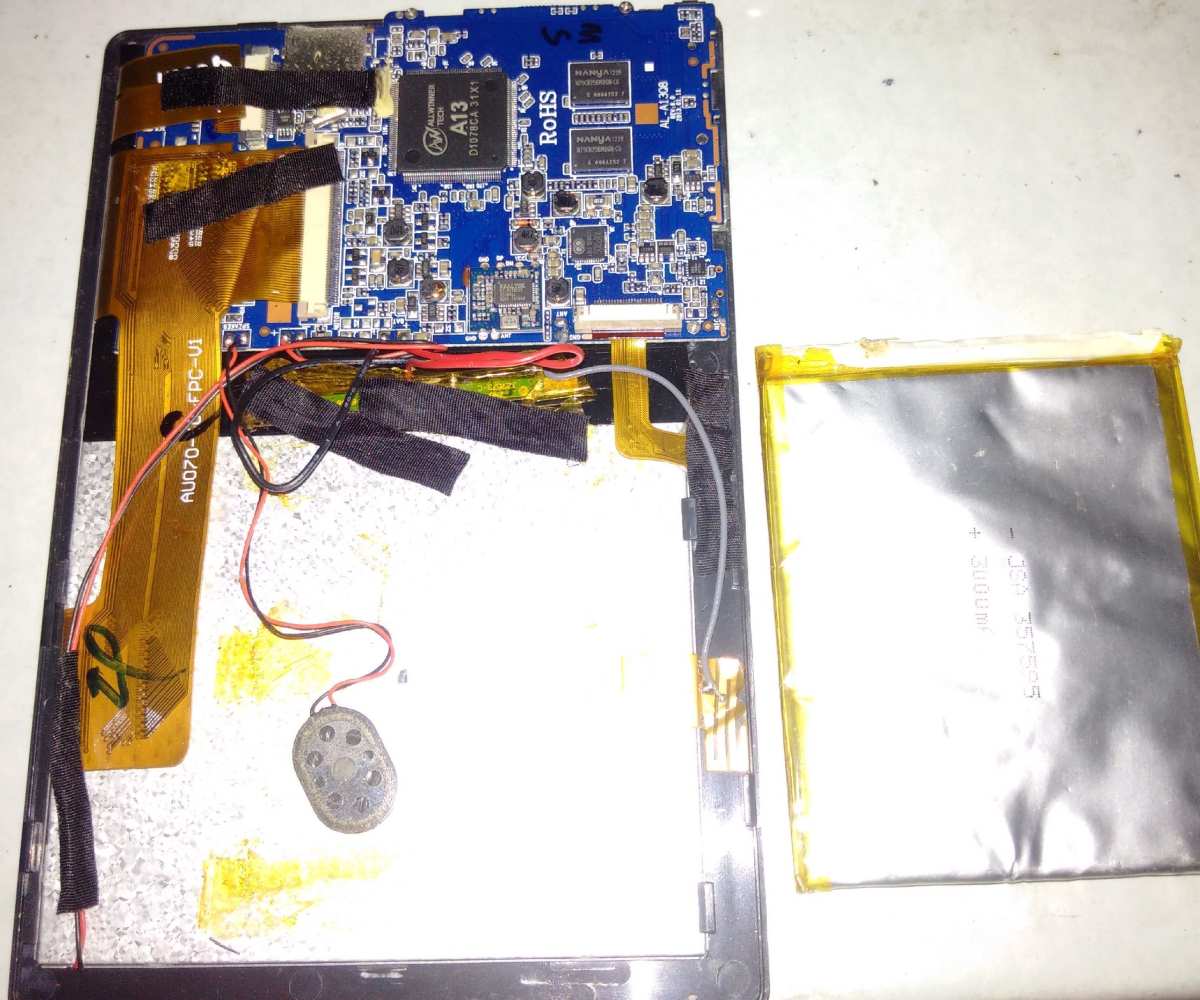
An android tablet without a battery might seem impossible, but it’s achievable with some creative solutions. **Connecting the tablet directly to a power source or using an external power bank** can keep it running without a built-in battery. This setup is perfect for continuous use in specific environments. Understanding these options helps you find practical ways to keep your device operational without relying on internal power.

Understanding the Concept of an Android Tablet Without a Battery
Have you ever heard of an Android tablet that operates without a traditional battery? Well, this idea might sound strange or even impossible at first, but in reality, there are innovative ways technology is approaching portable devices. Let’s explore what it means for an Android tablet to function without a battery and why some manufacturers and developers are interested in this concept.
Many people rely on tablets for work, entertainment, or studying. These devices are usually powered by rechargeable batteries, which offer portability. But what if there was a way to make a tablet that doesn’t need a battery at all? To understand this, we first need to look at how typical Android tablets work and what role the battery plays.
In a traditional tablet, the battery stores energy. When you press the power button, the device uses this stored energy to run the processor, display, sensors, and other components. It’s what allows us to use tablets on the go without being plugged into a wall socket. Without a battery, a device could only operate when connected directly to a power source. That means it would need to be plugged in to a wall outlet at all times, which limits its portability.
So, why consider creating an Android tablet without a battery? The answer mostly revolves around the idea of making devices lighter, cheaper, more durable, or environmentally friendly. Let’s find out what options exist for making this possible and what challenges engineers face.
How Do Android Tablets Typically Work?
To understand a device without a battery, it’s important to see what makes current tablets tick. Here are the main components of most Android tablets:
- Display: Shows images, videos, and apps.
- Processor: Acts as the brain, running all apps and functions.
- Memory: Stores temporary data for quick access.
- Battery: Supplies power for portable use.
- Charging Port: Connects to chargers to replenish the battery.
- Sensors: Detect movement, orientation, or environmental changes.
- Connectivity Chips: Enable Wi-Fi, Bluetooth, and cellular networks.
Most of these components operate on electrical power supplied either from the battery or directly from an external power source via the charging port. The battery allows the device to be used anywhere, without being tethered to a wire.
Why Is the Battery So Important?
The battery is the key element that gives tablets their portable edge. It stores chemical energy and converts it into electrical energy through chemical reactions. This process allows the device to run unplugged for hours.
However, batteries do have downsides:
- Weight: Batteries add weight, making devices bulkier and less comfortable to hold.
- Cost: Batteries are expensive parts that can increase the price of gadgets.
- Environmental Impact: Manufacturing and disposing of batteries can harm the environment.
- Limited Lifespan: Batteries degrade over time, needing replacement after a certain number of charge cycles.
Given these issues, some engineers are exploring alternatives that might eliminate the need for batteries altogether.
What Are Alternatives to Battery-Powered Devices?
While completely battery-free tablets are still in the experimental or conceptual phase, several innovative ideas exist around powering devices without traditional batteries:
- Power over Ethernet (PoE): Supplies power directly through the Ethernet cable, often used in fixed installations.
- Wired Power Supply: Constant connection to a wall socket keeps the device operational but sacrifices portability.
- Inductive Charging: Uses electromagnetic fields to transfer power wirelessly — at least in a limited range.
- Energy Harvesting: Captures small amounts of ambient energy from sources like light, heat, or vibrations, and converts it into electrical power.
The last option, energy harvesting, presents an intriguing possibility for creating devices that operate without traditional batteries. Let’s explore this concept further.
Energy Harvesting in Portable Devices
Energy harvesting means gathering energy from the environment to power electronic devices. For an Android tablet, this could involve capturing energy from:
- Sunlight: Using solar cells integrated into the device’s surface.
- Thermal energy: Converting temperature differences into electricity.
- Vibrations and movements: Using piezoelectric materials to generate power from motion.
If an Android tablet could efficiently harvest energy, it might operate indefinitely without a battery. But currently, the technology has limitations regarding power output and efficiency, making it unrealistic for full-sized tablets at this stage.
The Challenges of Making a Tablet Without a Battery
Creating a truly battery-free Android tablet involves overcoming significant hurdles:
- Power Supply and Consumption: The device must be constantly connected to a power source or harvest enough ambient energy to meet its demands, which is difficult given the high power needed for displays and processors.
- Design Constraints: Integrating solar panels or energy harvesters increases the device’s size and might reduce aesthetics or usability.
- Stability and Reliability: Fluctuations in power supply can cause the device to shut down unexpectedly, affecting user experience.
- Limited Mobility: Without a battery, users lose the freedom to move around, limiting the device’s appeal for everyday on-the-go use.
- Cost and Manufacturing Complexity: Incorporating advanced energy harvesting technology adds to manufacturing costs and complexity.
Despite these issues, the idea is appealing for specific applications — like fixed kiosks, industrial equipment, or smart displays that stay in one place and are powered by continuous energy sources.
Real-World Examples and Current Developments
Although fully battery-free Android tablets are rare, some projects and devices have explored related ideas:
- Solar-powered tablets: Certain rugged tablets designed for outdoor use include solar panels to extend battery life or keep the device charged in remote areas.
- Wired devices with external power sources: Many industrial tablets operate continuously with an external power line, making batteries unnecessary.
- Research prototypes: Labs are developing energy-harvesting setups that could power small sensors or low-energy devices for extended periods.
These efforts highlight how the need for battery independence drives innovation in power management and device design.
Future Outlook for Battery-Free Android Tablets
Looking ahead, advancements in materials and energy harvesting technology could bring us closer to fully functional, battery-free tablets. Here are some trends to watch:
- Better Solar Cells: Researchers are developing ultra-thin, flexible solar panels that can be integrated seamlessly into devices.
- Efficient Low-Power Chips: As processors become more power-efficient, devices require less energy to operate, making alternative power sources viable.
- Hybrid Approaches: Combining energy harvesting with wired or external power sources could provide longer-lasting solutions for specific use cases.
However, for everyday consumer devices, a balance between portability and power storage remains essential. Fully battery-free tablets might become a niche product, primarily for specialized environments.
While an Android tablet without a traditional battery is an exciting idea, current technology still faces significant limitations. Energy harvesting and alternative power methods show promise for specific applications, but they aren’t yet practical for making everyday portable devices that work on their own power for extended periods. In the near future, we may see more hybrid models or devices designed for fixed locations that rely on continuous power sources rather than batteries. As technology advances, the concept of a battery-free Android tablet could become more feasible, especially as environmental concerns about battery disposal and energy efficiency grow.
Understanding these innovations helps us see where portable device design is headed and why the quest for battery-free technology continues to inspire engineers and developers worldwide.
Frequently Asked Questions
How can I power an Android tablet that has no built-in battery?
If your Android tablet lacks a battery, you can power it directly through the charging port by connecting it to a stable power source using an appropriate AC adapter. Ensure that the power supply provides the correct voltage and current specified for your device to avoid damage. Be cautious to avoid unplugging or disconnecting the power while the device is in use to prevent interruptions or potential hardware issues.
Is it safe to operate an Android tablet without a battery attached?
Operating a tablet without a battery can be safe when it is powered directly from a reliable power source. However, it’s important to note that some devices are designed to require a battery for proper operation. Without the battery, sudden power interruptions or fluctuations could cause system errors or corrupt data. Always use a stable power source and avoid unplugging the device unexpectedly.
What are the common reasons for an Android tablet to have no battery?
There are several reasons a tablet might not have a battery. The battery could be physically damaged or degraded over time, leading to removal or disconnection. Sometimes, the battery might have been intentionally removed for repair, replacement, or troubleshooting. In other cases, manufacturing defects or misuse can cause the battery to fail, resulting in the device being operated solely through external power sources.
Can I upgrade or replace the battery in a tablet that originally came without one?
Generally, tablets designed without a battery are not built for user-replaceable batteries. If your device initially lacked a battery and you wish to add one, you would need to check with the manufacturer or a professional technician. Replacing or upgrading batteries in such models often requires technical skills, and incorrect installation could damage the device or void warranties.
What precautions should I take when using an Android tablet without a battery?
Use a high-quality, compatible power supply to prevent power surges or fluctuations. Avoid sudden disconnections from the power source to prevent data corruption or system errors. Keep the device in a safe location where it won’t be accidentally unplugged or exposed to electrical hazards. Additionally, monitor the device during use to ensure it remains properly powered and avoids overheating or other operational issues.
Final Thoughts
An android tablet without battery offers unique advantages for certain uses, such as continuous power supply during stationary setups. It simplifies device management by eliminating battery concerns, making it ideal for kiosk systems or digital signage. While it may limit portability, its benefits in stability and reliability stand out. In conclusion, the android tablet without battery provides a practical solution for specific applications where constant power is available.
