

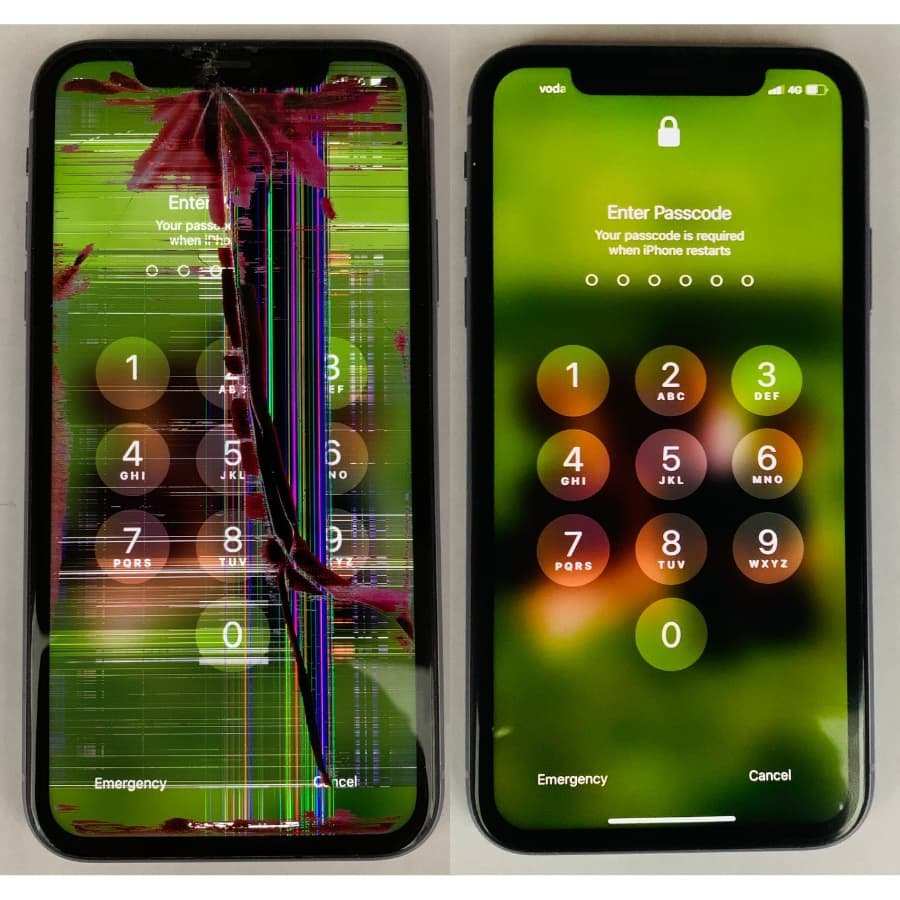
If your iPhone screen repair not working, the quickest fix usually involves reconnecting or replacing faulty components. **A common reason for failure is a poor connection or a defective screen assembly.** First, try restarting your device or checking for software updates, as glitches sometimes cause screen issues. If problems persist, visiting a professional repair service often yields the best results, ensuring your iPhone functions properly again.

Understanding Why iPhone Screen Repair Not Working and How to Fix It
When you get your iPhone screen repaired, you expect it to work perfectly afterward. But sometimes, even after the repair, problems still pop up. The screen might not respond, display strange colors, or be completely unresponsive. This can be frustrating, especially when you depend on your phone daily. Let’s explore why iPhone screen repair not working happens and what steps you can take to fix it.
Common Reasons Why iPhone Screen Repair Fails
Knowing the causes behind screen repair failures helps you understand what might be going wrong. Here are some common issues:
Improper Repair Techniques
Sometimes, the repair isn’t done correctly. This can include:
- Incorrect installation of the new screen
- Using low-quality replacement screens
- Not properly connecting flex cables
Poor repair techniques can lead to the screen not working or malfunctioning soon after the repair.
Damaged Internal Components
Your iPhone’s screen relies on many internal parts, like the display connector, flex cables, or the logic board. If these are damaged during repair or before, the screen won’t work properly. For example:
- Broken display connectors
- Damaged flex cables during disassembly
- Problems with the logic board or other internal parts
Software or Firmware Issues
Sometimes, the issue is not with the hardware but with software. An improper update or a glitch can prevent the new screen from displaying correctly.
Incompatible Parts
Using parts that are not compatible with your specific iPhone model can cause problems. Not all replacement screens work perfectly with every model, leading to issues like touch sensitivity problems or display errors.
Signs That Your iPhone Screen Repair Not Working Properly
Knowing what to look for can help you identify if your repair didn’t go as planned. Here are typical signs:
- The screen is unresponsive to touch
- Colors look distorted or strange
- Lines or spots appear on the display
- The screen flickers or turns black randomly
- Touch gestures don’t register correctly
If you notice any of these, your repair might need extra attention.
How to Diagnose the Problem
Diagnosing why your iPhone screen isn’t working after repair involves a few simple steps:
Check Hardware Connections
– Turn off your iPhone
– Carefully reopen the device (if you’re comfortable doing this)
– Examine the flex cables and connectors
– Make sure they are securely plugged in and not damaged
Test with Different Software
– Update your iPhone’s software to the latest version
– Restart the device and see if the issue persists
– Boot into recovery mode or DFU mode to restore the software if needed
Inspect the Replacement Part
– Verify if the new screen is genuine and compatible
– Check for visible damage or defects
– Consider testing with another screen if possible
How to Fix a Non-Working iPhone Screen After Repair
Once you identify the possible cause, you can take the necessary steps to fix it. Here are some solutions:
Reinstall or Reconnect the Display
Sometimes, the connection was not secure during the initial repair. Carefully disconnect and reconnect the flex cables, ensuring they snap into place properly. Use appropriate tools and be gentle to avoid causing further damage.
Replace Faulty or Incompatible Parts
If the display or flex cables are damaged or incompatible, replacing them with high-quality, compatible parts is necessary. Always opt for original or certified parts to ensure durability and functionality.
Update or Restore the Software
– Connect your iPhone to a computer
– Use iTunes or Finder to update or restore your device
– This process can fix glitches that may prevent the screen from working
Seek Professional Help
If you have tried the above steps but the screen still isn’t responsive, it’s best to consult a professional technician. They have the expertise to diagnose and repair underlying issues, such as logic board problems or internal component damage.
Preventing Future Screen Repair Problems
Prevention is better than cure. Follow these tips to avoid issues with your next screen repair:
- Choose reputable repair shops with experienced technicians
- Use high-quality replacement parts
- Request a warranty on the repair work
- Handle your iPhone carefully during and after repair
- Keep your software up to date to avoid compatibility issues
Getting your iPhone screen repaired should restore its full functionality, but sometimes, problems still occur after the repair. Understanding the common causes behind faulty screen repairs helps you identify the issue and decide whether to fix it yourself or seek professional help. Properly diagnosing the problem and using high-quality parts can prevent future issues, ensuring your iPhone continues to serve you well. Remember, taking good care of your phone and choosing reliable repair services can save you time and money in the long run.
Frequently Asked Questions
What should I do if my iPhone screen shows no response after a repair?
If your iPhone screen doesn’t respond after a repair, first ensure that the device is properly powered on. Perform a force restart to see if the screen responds. If it still remains unresponsive, contact the repair technician or service center that performed the repair. They can diagnose whether the issue results from a faulty connection, incompatible replacement parts, or other hardware problems that need fixing.
Why does my iPhone screen flicker or have display issues after repair?
Display flickering or visual issues after a repair often indicate a loose connection, damaged display cable, or incompatible parts. Check if the screen feels loose or moves slightly when touched. If you notice these symptoms, visit the repair provider to have the connection checked and reseated if necessary. In some cases, a defective new display might be the cause, requiring a replacement.
How can I troubleshoot if my iPhone screen is not turning on post-repair?
First, try charging your iPhone to rule out a power issue. Hold down the power button to see if the device responds. If it doesn’t turn on, perform a force restart. If it still remains off, inspect the repair work for any obvious disconnections or damage. If these steps do not work, reach out to the repair technician to verify if the internal components function correctly and that the repair process was successful.
What warranties or guarantees should I expect after an iPhone screen repair?
Reliable repair services typically provide a warranty on their work, covering issues like screen malfunction, display problems, or defective parts. Ask the repair technician about the duration of the warranty and what it covers. Keep the receipt or proof of service, as this will help you claim warranty support if problems arise shortly after the repair.
Is it normal to experience touch sensitivity issues after a screen repair?
Touch sensitivity problems can occur if the repair involves a faulty or incompatible touchscreen component, or if the new screen isn’t properly calibrated. In some cases, software updates or settings adjustments can improve responsiveness. If issues persist, visit the repair provider to have the screen checked and recalibrated, or to replace faulty parts that may be causing the problem.
Final Thoughts
In summary, troubleshooting an ‘iPhone screen repair not working’ issue involves checking for proper connection and compatibility. Sometimes, software glitches or improper repairs cause the problem. It’s essential to consult a professional if simple fixes don’t resolve the issue. Accurate diagnosis ensures your iPhone functions as expected.
