

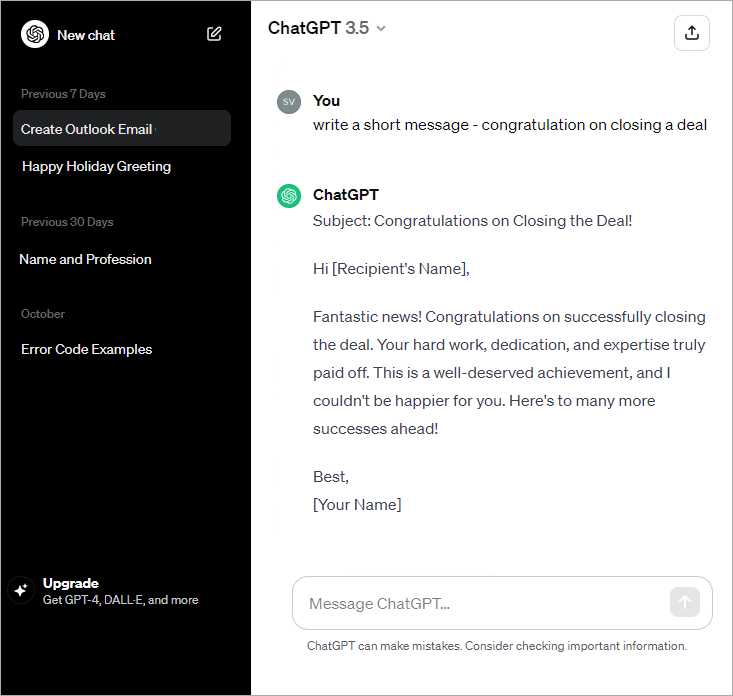
Want to save time crafting the perfect email without staring at a blank screen? Using ChatGPT, you can generate professional, clear, and engaging emails in just moments. Simply provide a prompt about the email’s purpose, tone, and recipient, and let ChatGPT do the rest for you.
ChatGPT helps you quickly create customized emails by understanding your instructions and generating text that fits your needs. Whether it’s a formal business message or a casual note, this AI tool streamlines the writing process, making communication faster and easier.
Writing emails can often feel tedious and time-consuming, especially when you want to get your message just right. ChatGPT is a fantastic AI assistant that takes the stress out of email writing by producing drafts based on your input. All you need to do is specify details like the topic, tone, and target audience, and ChatGPT will create a well-structured email that you can tweak or send as is. It’s like having a helpful writing buddy who’s always ready to assist you in putting your thoughts into words clearly and effectively.

How to use ChatGPT to create an email
Writing emails can sometimes feel challenging, especially when you want to sound clear and professional. ChatGPT offers an easy way to create well-structured emails quickly. Using this AI tool, you can draft messages that fit different purposes, from formal business emails to casual notes for friends.
Getting Started with ChatGPT for Email Writing
Before you begin, decide what kind of email you want to write. Is it a job application, a meeting request, or a simple thank-you note? Knowing the goal helps ChatGPT generate content that matches your needs. You can start by typing a prompt like, “Write a polite email asking for a meeting next week.” ChatGPT will provide a draft that you can then customize.
It is important to provide clear instructions. The more detailed your prompt, the better the output. For example, include the recipient’s role, the tone you prefer, and any key points you want to cover. This will guide ChatGPT in producing tailored content efficiently.
Structuring Your Email Using ChatGPT
Every email has a basic structure: a greeting, the body, and a closing. ChatGPT can help you build each part smoothly. Here is how to organize the email with the AI’s assistance:
- Greeting: Start with a friendly or formal salutation like “Dear,” “Hello,” or “Hi.”
- Opening line: Introduce yourself or state the purpose of the email.
- Main content: Present details, questions, or requests clearly in the body.
- Closing line: End with a polite note such as “Thank you for your time” or “Looking forward to your response.”
- Sign-off: Use a professional closing like “Best regards” or “Sincerely,” followed by your name.
When you ask ChatGPT to create an email draft, check if it follows this structure. If needed, you can request the AI to improve specific parts.
Customizing Tone and Style with ChatGPT
Tone plays a big role in how your email is received. ChatGPT can write in various styles, including formal, friendly, or casual. If you want a polite business letter, you might ask for “a formal email to a client.” For a friend, you could request “a casual and cheerful message.”
Make sure to mention your preferred tone in the prompt. This helps ChatGPT adjust vocabulary and sentence style. For example, formal emails often have full sentences and avoid slang, while casual emails may include contractions and simpler words.
Using ChatGPT to Save Time on Common Email Types
Certain emails are sent often, such as meeting requests, follow-ups, or thank-you notes. Instead of writing these from scratch every time, ChatGPT can generate templates for you.
- Meeting requests: Input details like date and reason, and ChatGPT will draft a clear invitation.
- Follow-up emails: Provide context like previous interaction, and the AI will create a polite reminder.
- Thank-you messages: Give details about the favor or help, and ChatGPT will form a gracious note.
Having these templates ready saves time and ensures consistent communication quality.
Improving Email Clarity and Grammar with ChatGPT
ChatGPT can help make your emails easy to read and error-free. After you write your message, you can ask the AI to check grammar, suggest simpler words, or improve sentence flow. This step is helpful especially for those who are not confident in writing or who speak English as a second language.
For example, if your draft is long or complicated, ChatGPT can shorten or simplify it without losing important information. Clear emails increase the chance of getting a positive response.
Adding Personalization and Details
Personalizing emails shows thoughtfulness and makes your message more engaging. ChatGPT can include names, references to past conversations, or specific details you provide. When prompting, include such information to add a personal touch.
For example, ask ChatGPT to write “an email to a client named Sarah thanking her for attending the recent webinar.” This makes the email feel less generic and more connected to the reader.
Ensuring Professionalism and Etiquette
Professional emails require careful attention to etiquette. ChatGPT can help you use polite phrases and avoid overly casual language. It also knows to include necessary elements like subject lines and appropriate closings.
Here are some tips ChatGPT can apply when asked:
- Use a respectful greeting and closing.
- Keep sentences concise and to the point.
- Avoid slang or emojis for formal communication.
- Maintain a positive and polite tone.
Following these ensures your emails make a good impression.
Using ChatGPT for Email Subject Lines
Subject lines are the first thing recipients see. A great subject line catches attention and summarizes the email content. ChatGPT can generate multiple subject options once you describe your email’s purpose.
For instance, typing “Suggest subject lines for a follow-up email after a job interview” will give you choices like:
- Following up on my recent interview
- Thank you for the interview opportunity
- Checking in on the interview status
Choosing a strong subject line helps increase the chances your email will be opened.
Integrating ChatGPT into Your Workflow
Using ChatGPT regularly can boost productivity. You might keep a list of common email prompts handy or save drafts generated by the AI. It is easy to copy, edit, and send emails once you have the content ready.
Remember to review and personalize the AI outputs before sending. This ensures accuracy and that your voice comes through. ChatGPT is a helpful assistant, but final checks keep communication authentic.
Security and Privacy Considerations
When using ChatGPT to write emails, be mindful of sensitive information. Avoid sharing confidential data or personal details you do not want to be stored or processed externally. Use generic descriptions when possible.
Always double-check the content before sending. Protecting privacy helps maintain trust and professionalism in email communication.
Exploring Additional Features for Email Creation
Beyond drafting, ChatGPT can help with related tasks like:
- Creating email signatures.
- Writing follow-up reminders.
- Summarizing long email threads.
- Generating bullet point lists for clarity.
These features add extra value and help maintain organized and effective email conversations.
Using ChatGPT to create emails brings convenience, clarity, and professionalism. By providing clear instructions and reviewing AI suggestions, you can craft messages that communicate your ideas clearly and politely. This tool supports a variety of email needs and styles, making it a practical companion in daily communication.
How I Use ChatGPT to Create 30+ High-Converting Email Ideas in Minutes
Frequently Asked Questions
How can I provide specific details to get a well-tailored email draft from ChatGPT?
When asking ChatGPT to draft an email, include important details such as the purpose, recipient type (e.g., colleague, client), tone (formal or casual), and any key points you want to cover. The more precise your instructions are, the better ChatGPT can create an email that fits your needs.
What steps should I follow to edit and personalize the email generated by ChatGPT?
After receiving an email draft, review it carefully to ensure it aligns with your voice and messaging style. Adjust any phrases or sections that feel off, add personal touches, and verify all factual information. This step helps make the email feel authentic and suitable for your context.
Can ChatGPT help with drafting emails in different languages or for various professional scenarios?
Yes, ChatGPT can generate emails in multiple languages and adapt the message for different industries or situations. Just specify the language and context when you prompt it, so it can tailor the content appropriately for your target audience.
How do I ensure the email generated by ChatGPT sounds natural and engaging?
To create a natural-sounding email, ask ChatGPT to use a conversational tone or include examples relevant to your industry. You can also request modifications focusing on clarity and friendliness to make your message more appealing and easier to read.
Is it possible to use ChatGPT to generate follow-up emails or responses?
Absolutely, you can instruct ChatGPT to draft follow-up emails or reply prompts. Provide the context of the previous communication and what you want to achieve with the follow-up, and it will help craft a clear and concise message.
Final Thoughts
Using ChatGPT to create an email simplifies the writing process and saves time. You can start by providing the key points you want to include, and ChatGPT will generate a clear, professional draft for you.
Adjust the tone and details as needed to fit your style and purpose. By following these steps, you ensure your message is both effective and engaging. How to use ChatGPT to create an email becomes straightforward and accessible with consistent practice.
